Bills of quantities for construction and renovation
The project budget, from catalogue to Excel, with no loose spreadsheets.
Billux keeps sections, groups and products in one catalogue, calculates quantities from dimensions and records every change. The whole team works on the same budget, each with their own access level.
Reply within 1 business day
Features
Built for the people who measure, price and answer for the final figure.
Hierarchical catalogue
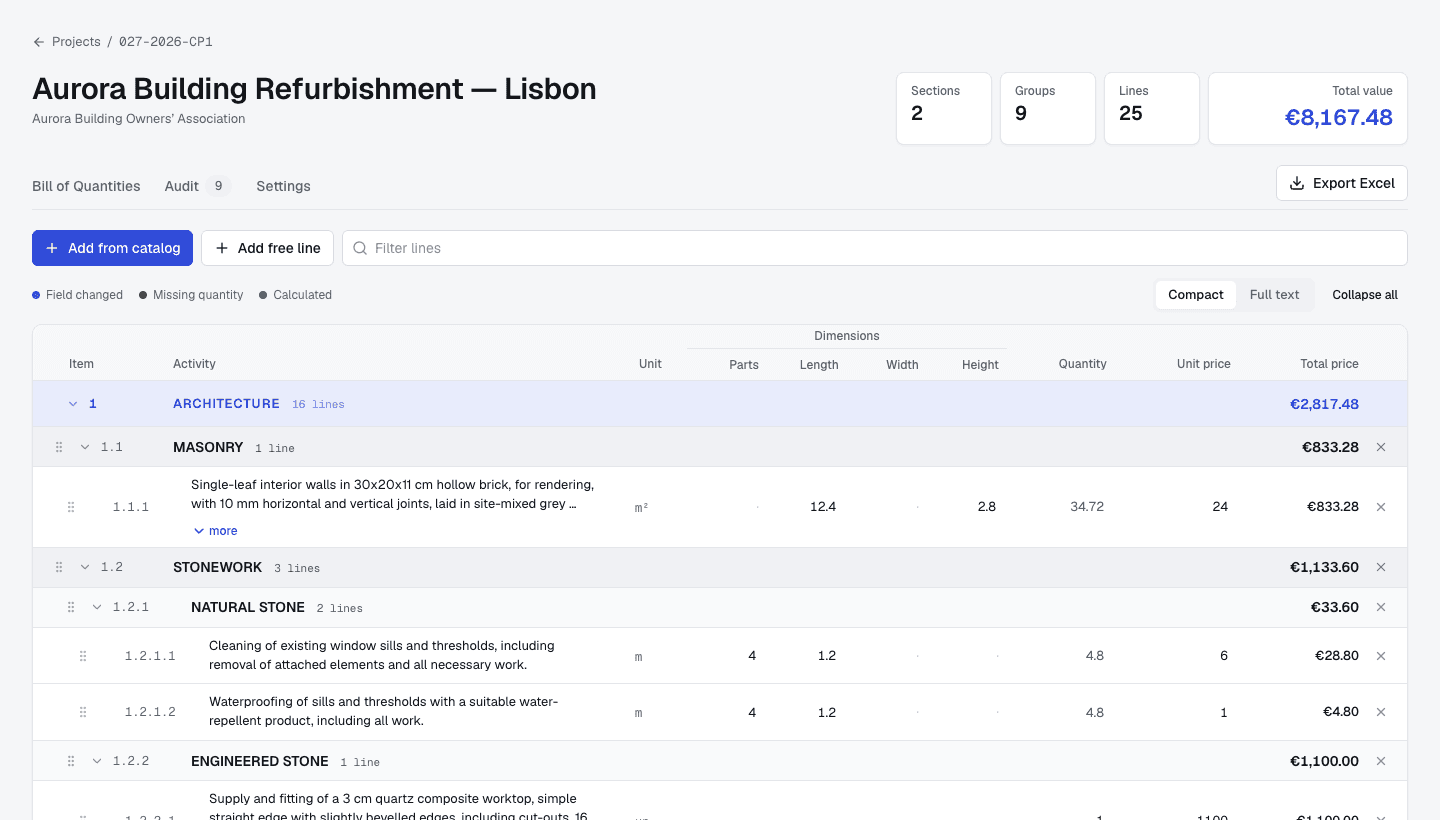
Sections, groups, subgroups and products with a unit, a reference price and the dimensions they need. Reuse them on every project.
Calculated quantities
Enter parts, length, width or height and the quantity is calculated. Lines with a missing quantity are flagged.
Prices under control
Change a unit price on one project and see the difference from the catalogue straight away. Reset it with one click.
Full audit trail
Every change is recorded: who, when, which field and the previous value. Filter by user or by type of action.
Four access levels
Administrators, catalogue managers, estimators and contributors — each sees and changes only what they should.
Excel export
Generate the bill of quantities as an .xlsx with formulas, ready to hand to the client.
Artificial intelligence
Coming soonThe repetitive work of a budget, prepared with AI.
We are bringing AI to Billux, for what repeats on every project. Every suggestion waits for your review before it enters the budget.
Import existing catalogues and budgets
Upload a catalogue or a bill of quantities as Excel or PDF. The AI sorts it into sections, groups and products, and matches each line to your catalogue.
Technical descriptions in one click
Write the essentials and the AI drafts the item's full description, in the style of your catalogue.
A review before you deliver
Before you export, the AI flags unusual prices, missing quantities and items that similar projects usually include.
Want to try it first? Talk to us.
On site or in the office
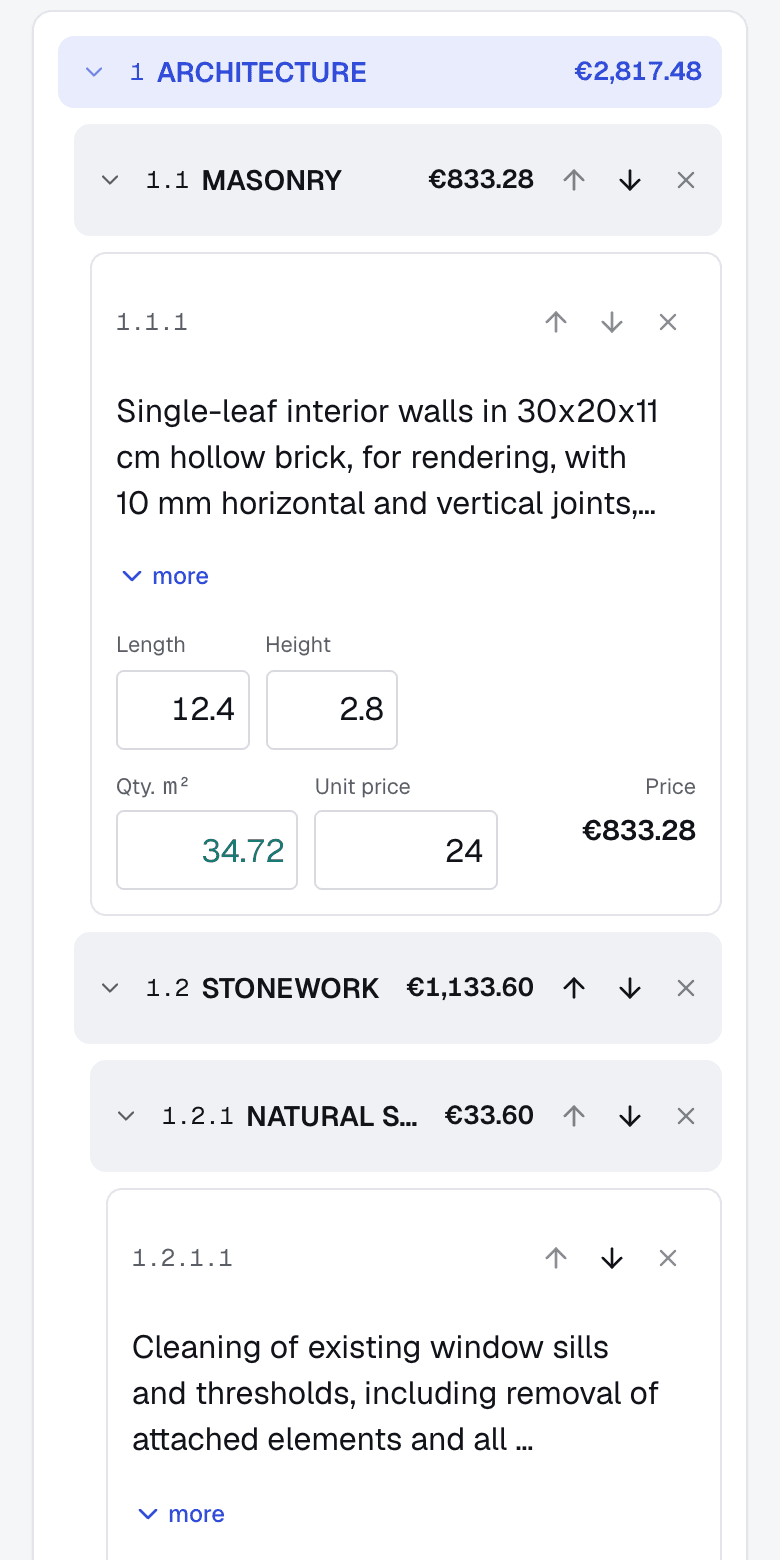
Update measurements on your phone. The total keeps up.
Build the budget from the catalogue
Pick a section, a group and products in one go. Item numbers always stay in order.
Measure and adjust on site
Enter dimensions and quantities on your phone, with fields designed for touch.
Export and deliver
The budget total is always up to date. Export to Excel when it is ready.
Contact
Talk to us.
Tell us how you budget today. We will show you Billux with your own bills of quantities and prepare a proposal that fits your team.
- A demo with your own budgets
- Reply within 1 business day
- Data hosted in the EU (GDPR)
Frequently asked questions
Who is Billux for?
Budgeting offices, contractors and renovation teams that prepare bills of quantities and project budgets, with several people working on the same budget.
Can I import my current catalogue?
Yes. You can create sections, groups and products by hand, and we help you import your catalogue from Excel.
Does changing the catalogue change existing projects?
No. Each product added to a project is a copy. You can change reference prices without affecting budgets you have already made.
How do access levels work?
Level A manages users and projects; B manages the catalogue; C builds budgets; D adds groups and products only in the sections assigned to them.
How much does it cost?
The price depends on the size of your team and the number of projects. Ask for a proposal through the contact form and we will reply within 1 business day.
Does Billux use artificial intelligence?
Not yet, but it is on the way: importing existing catalogues and budgets, drafting technical descriptions and reviewing the budget before you deliver it. Every suggestion always waits for your review.
Where is my data stored?
In the European Union: the database and files are hosted in Frankfurt, Germany, and processing follows the GDPR. When you create a bill with AI, the job description and any files you attach are sent to Anthropic, which processes them on our behalf to generate the proposal.